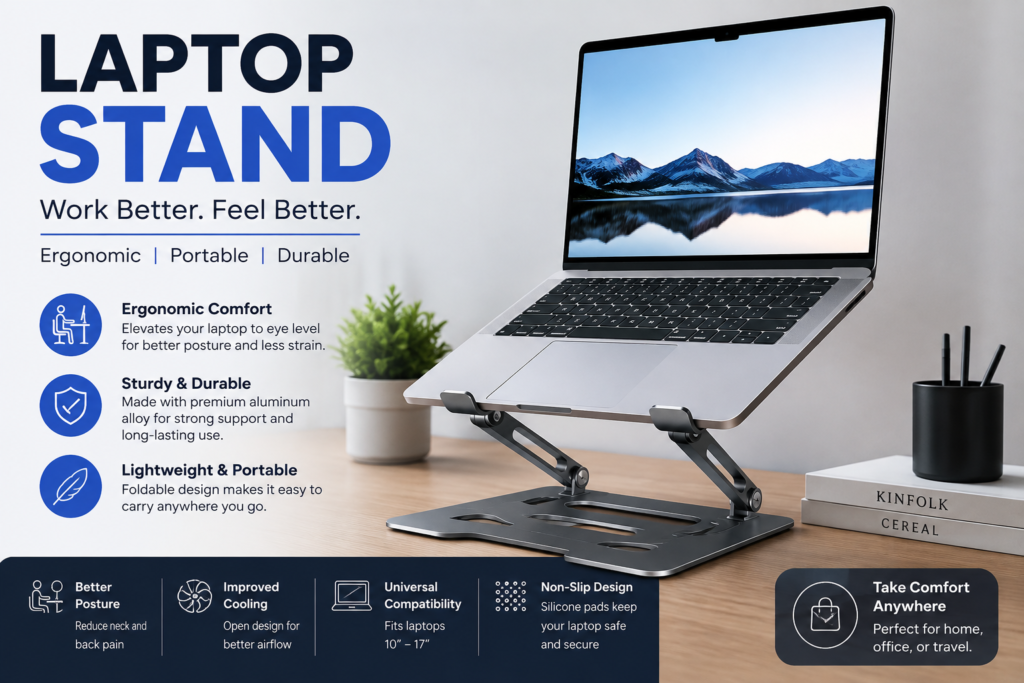
Laptop Stand A simple change in how your screen sits can reshape the way you work, study, or create for hours at a time. Raising a laptop off the desk surface brings the display closer to eye level and opens space underneath for better airflow. Many people discover this improvement only after weeks of neck strain or warm bottom panels that slow performance. The right support turns an ordinary table into a more comfortable station without requiring a full desk overhaul or expensive equipment.
Everyday users often underestimate how much a modest lift influences posture and concentration. When the screen sits too low, the head tilts forward and shoulders round inward. Over months that position contributes to stiffness and fatigue. Elevating the device encourages a more neutral spine and keeps wrists closer to a natural typing angle when an external keyboard joins the setup. Cooling benefits appear as well because air circulates freely beneath the chassis instead of trapping heat against a solid surface. These practical gains explain why so many remote workers, students, and creative professionals now treat a laptop stand as a basic rather than optional piece of gear.
Why Elevating Your Screen Changes Daily Comfort
Sitting for long stretches already challenges the body. Adding a downward gaze multiplies the load on the neck and upper back. A raised display reduces that constant forward lean and lets the eyes look roughly straight ahead. The difference feels subtle at first yet becomes obvious after a full afternoon of uninterrupted work. People who switch often comment that they finish the day with less tension and fewer urges to stretch or roll their shoulders.
Heat management forms another quiet advantage. Laptops generate warmth during video calls, document editing, or light creative tasks. When the bottom rests flat on a desk the vents work harder and fans spin louder. Creating space underneath allows cooler air to reach the intake areas more easily. The result is steadier performance and a quieter experience. Over time the internal components also face less thermal stress, which can support longer overall device life.
Workspace organization improves once the laptop rises. The area beneath becomes usable for a notebook, phone, or small accessories that previously competed for surface space. External keyboards and mice fit more naturally in front, creating a cleaner layout that feels intentional rather than improvised. These layered benefits accumulate into a noticeably more pleasant daily routine.
Exploring the Main Styles You Will Encounter
Fixed-height models offer simplicity and solid stability. They lift the laptop to one predetermined level and usually fold or collapse for storage. Many feature a minimal footprint that suits smaller desks. Because there are fewer moving parts they tend to feel sturdy and require little adjustment once placed.
Adjustable designs let users change the height and sometimes the angle. Telescoping legs, ratcheting hinges, or sliding mechanisms provide flexibility for different chairs, desk thicknesses, or shared workspaces. Someone who alternates between sitting and standing can fine-tune the position throughout the day. The extra versatility appeals to people whose setup changes frequently or who share the stand with others of varying heights.
Portable and foldable versions prioritize travel. Lightweight aluminum or reinforced plastic frames collapse into a slim package that slips into a bag alongside the laptop itself. These options suit students moving between classes, freelancers working from cafes, or anyone who values a consistent screen height away from home. Some even double as tablet stands when the laptop stays behind.
Cooling-focused stands incorporate open grids, mesh surfaces, or small fans. The design encourages airflow while still providing elevation. Gamers and video editors who push their machines harder often prefer these because sustained performance matters. The visual openness also gives a modern technical appearance that fits contemporary desks.
Core Advantages That Appear After Consistent Use
Posture gains rank among the most frequently mentioned improvements. Keeping the top of the screen near eye level reduces the need to crane the neck. Shoulders stay more relaxed and the lower back experiences less compensatory strain. Over weeks the cumulative effect can lessen end-of-day discomfort that previously felt inevitable.
Temperature control supports both comfort and hardware health. Lower surface temperatures mean the device can maintain higher performance for longer periods without throttling. Fans operate less aggressively, creating a quieter environment during calls or focused writing sessions. Users who previously rested a laptop on a pillow or soft surface notice especially clear differences once proper elevation and airflow return.
Productivity receives an indirect boost. When physical distractions such as neck tightness or warm palms decrease, attention stays on the task longer. The cleaner desk layout that often accompanies a raised laptop further reduces visual clutter. Many people report that the simple act of setting up the stand each morning signals the start of focused work, creating a small but useful ritual.
Selecting Features That Match Real Needs
Height range deserves first consideration. Measure from your desk surface to eye level while seated in your usual chair. Look for a stand that can place the top of the laptop screen within a few inches of that mark. Too low and the original problem remains; too high and new strain appears. Adjustable models make this matching process easier across different seating situations.
Stability and weight capacity matter for safety and peace of mind. A stand should hold the laptop securely without wobbling when keys are typed or the trackpad is used. Check the maximum supported weight against your device, including any heavier gaming or mobile workstation models. Non-slip silicone pads or textured surfaces keep the laptop from sliding during use or accidental bumps.
Portability needs vary widely. Someone who works only at one desk can prioritize rigidity and larger base area. Frequent movers benefit from quick fold mechanisms and low packed weight. Consider how the collapsed stand fits into existing bags and whether any sharp edges might snag fabric. A balance between sturdiness when open and compactness when closed serves most hybrid users well.
Material choice influences both feel and longevity. Aluminum provides strength and a premium appearance while remaining relatively light. Steel offers maximum durability at the cost of added weight. High-grade plastics reduce expense and can still perform reliably when engineered well. Wood or bamboo accents appear in design-focused models and bring warmth to a desk, though they may require more careful handling around moisture.
Understanding Materials and Construction Quality
Aluminum remains popular because it dissipates heat reasonably well and resists bending under normal loads. Brushed or anodized finishes hide fingerprints better than polished surfaces. Look for solid joints and smooth hinge action rather than thin tubing that flexes noticeably. Quality aluminum stands often feel substantial without becoming cumbersome.
Plastic constructions vary dramatically in performance. Reinforced polymers with internal ribbing can rival metal for everyday use while cutting weight and price. Thin or brittle plastics may develop stress cracks near pivot points after months of folding. Examining the thickness of load-bearing sections and the smoothness of moving parts helps separate durable options from short-lived ones.
Hybrid designs combine materials strategically. Metal legs paired with plastic platforms or silicone contact points deliver strength where needed and grip where it counts. Bamboo or wood tops over metal frames create an inviting aesthetic that softens a technical workspace. These combinations often strike a pleasing middle ground between industrial function and home-friendly style.
Adjustability Versus Simplicity in Daily Practice
Fully adjustable stands shine when multiple people share a desk or when posture needs change throughout the day. The ability to raise, lower, or tilt the platform accommodates different chairs, standing sessions, or even sofa work. Mechanisms range from simple friction hinges to more precise geared systems. Smoother adjustments encourage frequent fine-tuning rather than settling for a compromise position.
Fixed stands reward users who have dialed in one ideal height. With fewer parts they often feel more rigid and pack down smaller. Setup becomes nearly instant: unfold, place the laptop, and begin. For dedicated home offices where the chair and desk remain constant, the lack of moving components can feel like an advantage rather than a limitation.
Some models offer limited adjustability through interchangeable feet or simple screw systems. These provide a middle path for people who want occasional changes without complex mechanisms. Testing the adjustment process in person, when possible, reveals whether the action feels secure or prone to slipping under the laptop’s weight.
Portability Factors for People on the Move
Weight and folded dimensions determine how willingly a stand travels. Ultra-light models under a pound disappear into a backpack pocket. Slightly heavier versions still prove practical if they collapse flat and protect against scratches. Rounded edges and soft contact points prevent damage to other bag contents.
Durability during transit matters as much as open strength. Repeated folding should not loosen joints or strip threads. Look for locking mechanisms that keep the stand closed until deliberately opened. Some designs include small carry pouches that keep loose parts together and protect surfaces.
Cafe and library users appreciate stands that set up quickly on uneven or crowded tables. Wide bases resist tipping when the table surface is less than ideal. Quiet operation without rattling parts helps maintain a considerate presence in shared spaces. The best portable options feel almost invisible until needed, then deliver consistent elevation wherever work happens.
Ergonomic Principles Worth Applying
Eye level alignment forms the foundation. The goal is a gaze that stays roughly horizontal or only slightly downward. Achieving this usually means the laptop screen sits higher than most people expect when they first try a stand. Pairing the elevated laptop with an external keyboard and mouse completes the ergonomic picture by keeping wrists neutral and shoulders relaxed.
Monitor distance also influences comfort. Raising the screen sometimes brings it closer; a slight backward tilt or a deeper desk placement can restore a comfortable viewing range. Taking short breaks to look farther away reduces eye strain regardless of stand height. Lighting that avoids glare on the elevated screen further supports longer comfortable sessions.
Chair and desk relationship remains important. Even the best stand cannot compensate for a chair that forces awkward reaching or a desk that sits too high relative to the elbows. Viewing the entire workstation as a system produces better results than focusing on any single accessory. Small incremental changes often yield larger comfort gains than dramatic isolated upgrades.
Creating a Cohesive Desk Layout Around the Stand
Once the laptop rises, the space underneath becomes valuable real estate. A slim notebook, charging cables, or a secondary input device can occupy that zone without cluttering the main surface. External keyboards typically sit closer to the body, reducing reach and encouraging better shoulder position.
Cable management grows easier with elevation. Power and peripheral cords can route behind or beneath the stand rather than sprawling across the desk. Simple clips or a basic cable tray keep the visual field clean. The overall effect feels more intentional and less temporary.
Lighting placement may need minor adjustment. Desk lamps that previously cleared a flat laptop might now cast shadows or create glare. Experimenting with angle and height restores even illumination across the keyboard and screen. These small refinements transform a functional setup into one that feels genuinely supportive for extended work.
Typical Price Ranges and What They Deliver
Entry-level stands focus on basic elevation and acceptable stability. They often use plastic or lightweight metal and provide one or two fixed heights. For occasional use or tight budgets they solve the core problem without unnecessary features.
Mid-range options introduce smoother adjustability, better materials, and thoughtful extras such as cable cutouts or improved non-slip surfaces. Build quality becomes more consistent and the stands tend to last through years of daily folding and unfolding. Most people find the sweet spot in this category.
Premium models emphasize refined aesthetics, precision mechanisms, and maximum weight capacity. CNC-machined aluminum, silent hinges, and carefully considered proportions justify higher prices for users who value both performance and desk appearance. Longevity and resale value sometimes offset the initial investment.
Maintenance Practices That Extend Useful Life
Simple cleaning keeps surfaces free of dust and oils that reduce grip. A soft cloth and mild cleaner suffice for most materials. Avoid harsh solvents that might degrade coatings or silicone pads. Periodic checks of screws and hinges catch loosening before it becomes noticeable during use.
Storage habits matter for foldable designs. Collapsing the stand fully and storing it flat or in its pouch prevents accidental stress on joints. Avoiding extreme temperature swings, such as leaving it in a hot car, protects plastic components and adhesives. Treating the stand with the same care given to the laptop itself preserves performance.
When parts eventually wear, many manufacturers offer replacement feet, pads, or screws. Keeping the original packaging or model information simplifies ordering. A well-maintained stand often outlasts several laptop upgrade cycles, making the original purchase more economical over time.
Style Considerations for Different Environments
Minimalist desks benefit from clean lines and neutral finishes that recede visually. Matte black, silver, or white stands blend with most equipment and keep attention on the work rather than the accessories. Subtle branding or no visible logos support this understated approach.
Creative or home-oriented spaces sometimes welcome warmer materials or distinctive shapes. Wood grain, colored accents, or sculptural forms turn the stand into a deliberate design element. Matching the stand to nearby objects such as a desk mat or lamp creates visual harmony that makes the workspace more inviting.
Shared or professional offices usually favor understated durability. Neutral colors and robust construction signal practicality. Avoiding overly delicate or highly personal designs keeps the stand appropriate for multiple users and changing environments.
Table of Common Laptop Stand Categories
Category | Primary Strength | Best Suited For | Relative Weight | Typical Adjustability Fixed Height | Simplicity and rigidity | Dedicated single desk | Light to moderate | None Fully Adjustable | Versatility across users | Shared or changing setups | Moderate | High Portable Foldable | Easy transport | Travel and hybrid work | Very light | Limited to moderate Cooling Focused | Airflow and sustained performance | Intensive tasks and gaming | Moderate | Varies Design Oriented | Aesthetic integration | Home offices valuing style | Light to moderate | Limited
This overview shows how priorities shape the ideal choice. No single category suits every situation, yet understanding the trade-offs narrows the field quickly. Real-world testing remains the most reliable way to confirm which balance feels right.
Insights Shared by Frequent Users
“I resisted buying one for years because it seemed unnecessary,” admits a long-time remote worker. “Once I raised the screen my neck stopped complaining by mid-afternoon. The difference was immediate and lasting.”
A university student notes, “Carrying a lightweight stand between the library and my apartment means I never have to settle for a bad table height. It folds small enough that I forget it’s in the bag until I need it.”
An independent designer observes, “The stand freed space under the laptop for my sketchbook and pen. Suddenly the desk felt larger and more usable without changing the furniture at all.”
These reflections highlight how personal the benefits become once the stand enters daily use. Individual circumstances differ, yet the core improvements in comfort and organization appear consistently.
Adapting the Stand for Standing Sessions
Many adjustable models reach heights suitable for standing desks or countertop work. Pairing the elevated laptop with a separate keyboard tray or simply placing the keyboard at elbow height maintains neutral wrists. The same eye-level principle applies whether sitting or standing.
Transitioning between positions becomes smoother when the stand adjusts quickly. Users who alternate throughout the day appreciate mechanisms that lock securely at multiple points. Stability grows more critical at greater heights, so wider bases or weighted designs help prevent tipping during enthusiastic typing.
Lighting and monitor distance may need re-checking in the standing posture. What worked while seated can create glare or force a slight lean once upright. Small iterative adjustments keep both positions comfortable rather than treating one as primary and the other as an afterthought.
Supporting Creative and Media Workloads
Video editors, photographers, and digital artists often run demanding software that generates significant heat. Stands with open structures or active cooling help maintain consistent frame rates and export times. The elevated position also makes color-critical work more pleasant by reducing neck strain during long review sessions.
Multiple external displays become easier to arrange when the laptop itself sits at a sensible height. The laptop screen can serve as a secondary timeline or tool panel while the main monitors handle the primary canvas. Cable routing behind the stand keeps the creative desk looking intentional rather than temporary.
Input devices such as drawing tablets or control surfaces fit more naturally once the laptop no longer occupies the entire central zone. The overall workflow feels less cramped and more professional, supporting longer immersive sessions without physical distraction.
Considerations for Shared and Family Workspaces
Households with several laptop users benefit from stands that adjust easily and reset quickly. Clear height markings or simple mechanisms reduce negotiation time. Durable construction withstands more frequent handling and the occasional less-than-gentle adjustment.
Neutral styling helps the stand feel appropriate for different ages and preferences. Avoiding overly childish or aggressively technical designs keeps the accessory usable by everyone. Storing a small external keyboard nearby completes a flexible station that any family member can claim temporarily.
Teaching younger users good posture habits becomes easier when the equipment itself encourages better alignment. A stand that makes the correct height obvious supports long-term comfort as study and entertainment habits form.
Future-Proofing Your Choice
Laptop sizes and port layouts continue to evolve. Choosing a stand with a generous platform and flexible support arms accommodates both current and next devices. Weight ratings that exceed today’s machine provide margin for heavier future models or the addition of external drives.
Modular designs that accept replacement pads or feet extend usable life when high-wear parts eventually need attention. Brands that maintain parts availability for several years offer additional peace of mind. Viewing the purchase as multi-year infrastructure rather than a short-term accessory encourages more thoughtful selection.
Compatibility with common accessories such as monitor arms or docking stations can also influence longevity. A stand that plays well with the broader ecosystem remains useful even as other elements of the desk change.
Integrating Cooling and Cable Solutions
Some stands incorporate subtle cable channels or hooks that guide power and peripheral cords neatly. Others leave the underside completely open for maximum airflow and user-arranged routing. Either approach works when executed thoughtfully.
Active cooling versions with quiet fans suit users who regularly push thermal limits. Passive designs rely on geometry alone and appeal to those who prefer zero noise and zero power draw. Matching the cooling approach to actual workload prevents both overheating and unnecessary complexity.
Keeping intake vents clear remains essential regardless of stand type. Periodic dusting of the laptop’s underside and the stand’s surface maintains the airflow advantage that elevation provides. These small habits compound into noticeably better long-term performance.
Building Sustainable Habits Around the Setup
The physical presence of a stand can serve as a reminder to take posture breaks. Pairing the elevated setup with a simple timer or stretch routine multiplies the comfort benefits. Over months the combination of better alignment and regular movement produces more sustainable energy levels.
Decluttering the desk surface once the laptop rises often inspires further organization. Cable management, better lighting, and intentional accessory placement follow naturally. The stand becomes the first step in a broader refinement of the workspace rather than an isolated purchase.
Consistency matters more than perfection. Using the stand every day, even for short sessions, reinforces the posture improvements. Occasional work from the sofa or bed still happens, yet returning to the elevated setup feels like coming home to a more supportive environment.
Conclusion
A well-chosen laptop stand delivers outsized returns in comfort, temperature control, and daily focus. By raising the screen to a healthier height and freeing space beneath the device, it addresses problems many people have simply accepted as normal. From fixed and adjustable models to portable and cooling-focused designs, options exist for nearly every routine and budget. Paying attention to height range, stability, materials, and real usage patterns leads to a stand that disappears into the background while quietly improving every hour spent at the keyboard. The result is a workspace that supports both the work itself and the person doing it, day after day.
FAQs
What height should a laptop stand provide for comfortable use?
The ideal height places the top of the laptop screen near eye level when you sit in your normal working posture. This usually requires more elevation than most people first expect. Measuring from desk surface to eye level while seated gives a useful target. Adjustable models make reaching that target easier across different chairs and desks. Pairing the raised laptop with an external keyboard keeps wrists and shoulders in a neutral position as well.
Can a laptop stand improve device temperature during long sessions?
Yes. Elevating the laptop allows air to flow more freely around the bottom vents and intake areas. Heat that previously trapped against the desk surface can dissipate more effectively. Many users notice quieter fans and more consistent performance once the device no longer sits flat. Stands with open grids or mesh surfaces enhance this effect further, especially during demanding tasks.
Is a portable laptop stand sturdy enough for everyday typing?
Quality portable designs balance light weight with sufficient rigidity for normal use. Look for solid locking mechanisms, non-slip contact points, and a weight rating that exceeds your laptop. While the absolute sturdiness may fall short of heavy desktop models, well-engineered foldable stands handle daily typing, trackpad use, and occasional travel without noticeable flex or wobble.
How does a laptop stand fit into a complete ergonomic setup?
The stand addresses screen height, which is one major piece of the posture puzzle. Adding an external keyboard and mouse allows the hands to rest at a comfortable distance and angle. Proper chair height, desk depth, and lighting complete the system. When all elements work together, the elevated laptop becomes part of a more sustainable and comfortable long-term arrangement rather than a partial fix.
What maintenance does a typical laptop stand require?
Most stands need only occasional cleaning with a soft cloth to remove dust and oils. Checking hinges, screws, and rubber pads every few months catches wear early. Foldable models benefit from full collapse and protected storage when not in use. Avoiding extreme heat or harsh chemicals preserves materials and mechanisms. With basic care, a good stand often remains functional across multiple laptop replacements.